Project & Lesson Rubrics
This rubric is designed to support flexible evaluations when completing a lesson or project using Forward Education’s kits. Print this rubric to provide feedback to students who complete any of Forward Education’s lessons or projects using a kit from the Forward Education ecosystem.
Tips for Using

Evaluate students in all areas on page 1, and only the categories (Use, Modify, Create) that the students completed on page 2.
For example, a student who completes a project following both the “Modify” and “Create” phases of a lesson does not need a score in the “Use – Understanding” section of the rubric.

No phase is better than another. Students using any phase will apply coding practices. When using this rubric, we recommend weighting the Use, Modify, and Create sections equally.
For example, if a project allowed students to select any phase they wish when completing a lesson, students who selected the “Use” phase should not automatically receive a lower score for not selecting the “Modify” phase.
More Evaluation Resources
Use-Modify-Create
Forward Education aligns all activities to the research-backed Use Modify Create framework. This instructional approach to computational thinking helps learners build coding and problem-solving skills. When using this rubric, depending on how many phases students were asked to complete (e.g., Modify & Create), feel free to leave the remaining areas blank (e.g. Use).

Learn more about this educational framework, and define each coding phase below.
Standards Alignment
The rubric was developed as a benchmarking tool to guide student success. It is informed by national standards for Computer Science (CSTA), Math (Common Core), and Science (NGSS). Combine this tool with triangulated assessment options and specific curriculum alignment featured on each lesson overview page.
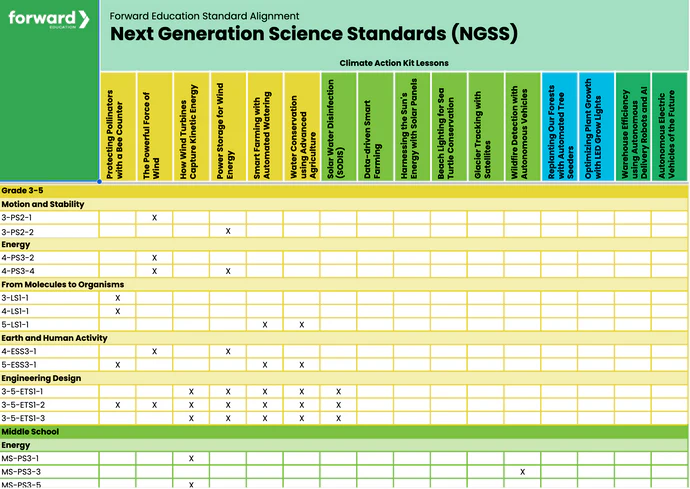
For more detailed standards, explore the standards alignment document.